

Small fleets and owner-operators have Matrack AI Dashcam M4000 as their option here, while personal-car buyers get 70mai Dash Cam 4K Omni. The other three selections address large-fleet deployments, panoramic recording, and lower-cost 360° cameras.
These cameras do not create a 360° view in the same way. A rotating lens turns toward different areas around the vehicle, panoramic models combine wide-angle views, and multi-channel or fleet systems record several feeds at the same time. A camera that turns toward an event records differently from a setup that keeps several directions on video continuously.
Resolution tells only part of the story. Image quality, hardware price, recurring cost, installation, parking and remote functions, and intended use were compared using current manufacturer documentation, published specifications, and listed pricing. No hands-on road testing was used for these selections.
What Are 360-Degree Dash Cams?
A 360-degree dash cam records the road, cabin, sides, rear, or a combination of these areas around a vehicle. Depending on the design, it may use a rotating lens, stitched panoramic views, several fixed camera channels, or auxiliary cameras mounted around the vehicle.
These additional angles help drivers and fleet operators review crashes, parking incidents, cabin events, or activity beside and behind the vehicle. They may capture details a conventional front-facing dash cam misses, although the exact angles recorded at the same time depend on the camera design.
Our Top Picks for 360-Degree Dash Cams in 2026
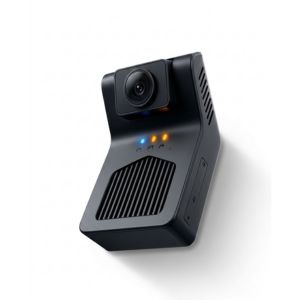 Matrack AI Dashcam M4000
- Best For: Small fleets / owner-operators
- Hardware Cost: $99
- Resolution: 1080p road + IR cab
- Recording: Dual + optional side/rear/cargo
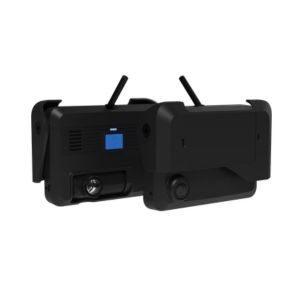 Samsara AI Multicam
- Best For: Large fleets
- Hardware Cost: Custom quote
- Resolution: 1080p feeds
- Recording: Auxiliary cameras
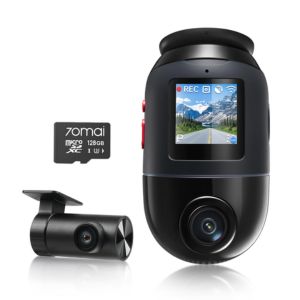 70mai Dash Cam 4K Omni
- Best For: Cars
- Hardware Cost: From $199.99
- Resolution: 4K60 single / 4K30 dual
- Recording: Rotating + optional rear
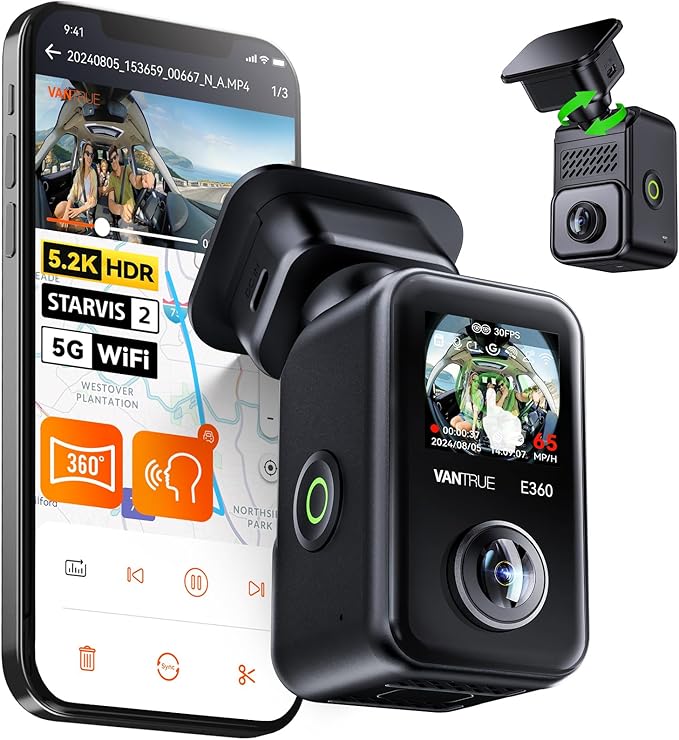 Vantrue E360
- Best For: Panoramic recording
- Hardware Cost: From $184.99
- Resolution: Up to 5.2K
- Recording: Dual 210° stitched views
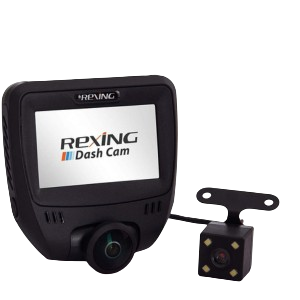 Rexing V360
- Best For: Budget option
- Hardware Cost: $59.99
- Resolution: 1440×1440 @ 30 fps
- Recording: Panoramic + rear
How We Evaluated 360-Degree Dash Cams?
We looked at the five picks from a buyer’s point of view, not as a race for the biggest number on a spec sheet. Each option was considered around the needs of the people likely to use it, from personal-car owners to commercial fleet operators.
Consumer models and fleet systems were judged on their own terms before we put them side by side. The checklist below kept the review consistent without pretending every option solves the same problem.
- Recording method and simultaneous capture
- Resolution and night/cabin video
- Parking, GPS, and remote functions
- Storage and installation
- Hardware price
- Subscription or data costs
- Intended buyer and limitations
What Are the Best 360 Degree Dash Cams in 2026?
A 360-degree dash cam can mean very different hardware: multiple synchronized fleet cameras, a motorized lens that turns around the vehicle, or ultra-wide cameras that record a panorama at the same time.
1. Matrack AI Dashcam — Best for Small Fleets and Owner-Operators
Matrack AI Dashcam is a fleet dash cam with GPS built around a 1080p road-facing camera and a 1080p active-IR driver camera. The standard unit covers the road and cab; 360-degree coverage comes from adding left-side, right-side, and rear or cargo cameras for up to five synchronized views. A small fleet can begin with the two-camera setup and add surrounding views later.
The infrared driver camera keeps the cab visible in darkness, with DMS monitoring for distraction, drowsiness, phone use, smoking, and missing seatbelts. ADAS covers road events such as forward-collision risk, tailgating, lane departure, and stop-sign alerts. When one of those events is triggered, 4G LTE sends the related footage to Matrack’s fleet platform, and the recording includes 30 seconds before and after the event.
Matrack also links the dash cam with its ELD ecosystem. Depending on the service package, the platform can include HOS logging, DVIR, roadside log transfer, IFTA reporting, geofence alerts, and speed alerts. For an owner-operator or small fleet handling both safety and compliance, video and ELD work stay within the same platform as camera coverage expands.
Pros and Cons
| Pros | Cons |
|---|---|
| ✅ Keeps ELD and video workflows unified | ❌ Auxiliary cameras add installation complexity |
| ✅ Ranks higher-risk events for faster review | ❌ Road-facing recording remains limited to 1080p |
| ✅ Supports optional fuel and temperature sensors |
Features
Five-camera expansion
Active IR cabin
DMS driver monitoring
ADAS road alerts
4G live streaming
512GB local storage
Synchronized camera feeds
2. Samsara AI Multicam — Best for Large Fleets
Large fleets need surrounding coverage that remains manageable across many vehicles. Samsara AI Multicam handles four auxiliary 1080p cameras through one Multicam Hub or eight auxiliary cameras with Dual AI Multicam. Add a dual-facing Samsara dash cam and one vehicle can carry up to 10 HD video streams.
Bird’s Eye View stitches selected feeds into a configurable top-down view for reversing and crowded-yard maneuvers, while camera-health reporting and obstruction detection help staff identify feeds that need attention. The same platform connects video with maintenance, routing, compliance, TMS, OEM, and other fleet systems through Samsara’s integration and API ecosystem.
Pros and Cons
| Pros | Cons |
|---|---|
| ✅ Extended clips improve crash reconstruction | ❌ Dual hubs increase installation hardware |
| ✅ Optional audio adds useful event context | ❌ Each monitor shows one hub only |
| ✅ Flexible mounting suits specialized vehicle areas |
Features
Eight-camera expansion
Bird’s Eye View
AI risk detection
Obstruction detection
Camera health reporting
Third-party camera support
3. 70mai 4K Omni — Best for Cars
A motorized lens gives the 70mai 4K Omni its version of 360-degree coverage. The front camera pans roughly 340 degrees and uses AI Motion Detection 2.0 to turn toward activity around the car, particularly during parking monitoring. Compatible hardwiring keeps parking functions active after the ignition is switched off, and an optional 4G kit adds remote monitoring, alerts, and vehicle-location functions.
The Sony STARVIS 2 IMX678 sensor records up to 4K/60fps in single-channel mode. Drivers can add the RC14 rear camera for a dedicated 1080p view behind the car, with the front channel running at 4K/30fps in that configuration. The Omni’s 360-degree concept is directional rather than panoramic: the motorized front lens turns toward different areas instead of recording every surrounding angle at once.
Pros and Cons
| Pros | Cons |
|---|---|
| ✅ Buffered recording captures pre-impact footage | ❌ Parking features need separate hardwiring |
| ✅ Rear camera adds dedicated coverage | ❌ Dual-channel recording drops front frame rate |
| ✅ Voice control reduces manual interaction |
Feature
360° rotating lens
4K 60fps capture
Motion Detection 2.0
Dual-channel HDR
Wi-Fi 6 transfers
4. Vantrue E360 — Best for Panoramic 360° Recording
Two 210-degree lenses record simultaneously on the Vantrue E360. Their ultra-wide feeds are stitched into a single 360-degree panorama at up to 5.2K using Sony STARVIS 2 IMX675 imaging, preserving the surrounding scene in one simultaneous recording.
Panoramic recording gives an incident more surrounding context, but the enormous field of view spreads image detail across a wider scene. Distant vehicles and license plates occupy less of the frame than they would with a narrower camera, so fine detail at distance can be harder to preserve.
Pros and Cons
| Pros | Cons |
|---|---|
| ✅ HDR improves difficult lighting detail | ❌ Parking monitoring requires separate hardwiring |
| ✅ Buffered motion preserves pre-event activity | ❌ Rear camera remains an add-on |
| ✅ Built-in GPS logs trip mileage |
Features
Dual 210° lenses
5.2K stitched panorama
STARVIS 2 sensor
Eight IR LEDs
5GHz Wi-Fi
1TB card support
Magnetic camera mount
5. Rexing V360 — Best for Budget-Friendly 360° Coverage
A panoramic main camera gives the Rexing V360 its surrounding view, recording at 1440×1440 at 30fps, and an included rear camera adds a separate view behind the vehicle. Together, the cameras cover the front, cabin, surrounding area, and rear without the expandable hardware used by commercial multicamera systems.
The V360 uses an older, lower-resolution recording platform than the newer 4K and 5.2K consumer models in this group. Fine detail is more limited, particularly at distance, but the panoramic main camera still keeps more of the vehicle’s surroundings in view than a conventional forward-only dash cam.
Pros and Cons
| Pros | Cons |
|---|---|
| ✅ WDR balances challenging exposure conditions | ❌ Front video peaks at 1440p |
| ✅ Four viewing modes add flexibility | ❌ Storage support stops at 256GB |
| ✅ Rear camera comes in package |
Features
360° panoramic lens
3-inch IPS display
Reverse camera view
G-sensor file locking
Which Type of 360-Degree Dash Cam Should You Choose?
A personal car, an owner-operated truck, and a large commercial fleet call for very different camera setups. Camera placement, the number of views recorded, installation, and remote access all change with the vehicle and the way it is used.
Small Fleets and Owner-Operators
Road and driver views cover the core needs of a smaller fleet. Matrack AI Dashcam M4000 combines both with driver-safety monitoring and remote access. Side, rear, or cargo channels are available when another angle is needed, and service runs month to month without a long-term contract.Large Fleets
Larger commercial vehicles may have several areas that a single windshield camera cannot see. With Samsara AI Multicam, fixed auxiliary cameras can be positioned around the vehicle and viewed through an in-cab monitor, while recorded footage remains available in the cloud for fleet review. The installation is more involved, and pricing is quote-based.Personal Cars
The 70mai Dash Cam 4K Omni uses a rotating main camera at the windshield to capture views around a personal vehicle. An optional rear camera adds a fixed view behind the car without requiring a larger multi-camera installation.Panoramic Recording
Panoramic recording keeps the surrounding scene together instead of splitting it across several independent feeds. Vantrue E360 combines two 210° views into a single stitched image. Separate side and rear feeds would require a multi-camera arrangement.Budget 360° Coverage
Rexing V360 keeps the upfront price lower while recording front, cabin, and rear views locally. No required monthly service is listed for its core recording functions. Remote and cloud features are more limited than on the connected systems.Best 360-Degree Dash Cam Buying Guide
Coverage Method
Rotating models follow one direction at a time, panoramic designs combine wide views, and fixed channels hold their assigned angles. A fixed multi-camera layout keeps side or rear views active through the same event.Simultaneous Recording
A motorized lens turns toward a direction, while fixed channels keep their assigned views running together. For incidents that move from front to side or rear, that distinction affects what the footage actually captures.Video Resolution
Active recording mode matters as much as the headline resolution. Some models reach their highest setting only in single-channel mode, then lower frame rate or resolution when another feed is added.Night Vision
IR cabin recording and exterior low-light performance answer different questions. Infrared helps capture the interior in darkness, while road-facing image quality depends on how the exterior camera handles low light.Parking Mode and Power
Parking features depend on how the camera stays powered after the ignition is off. Hardwiring may be required for motion- or impact-triggered recording, and battery protection matters during long parking periods. Some modes save footage only after an event instead of recording continuously.Storage and Cloud Access
Local storage keeps footage on a microSD card, with retention shaped by card capacity and recording settings. Cloud access gives an owner or fleet team remote retrieval without relying on the card inside the vehicle.GPS, AI and Driver Alerts
GPS adds location to trip or video records. AI features analyze defined events such as driver behavior or motion. Alerts surface those events to the driver, owner, or fleet team.Installation
More camera positions usually mean more installation work. A windshield unit with a rear lead uses fewer mounting points and cable runs than a commercial configuration with side, rear, or cargo cameras.Upfront Cost and Monthly Subscription
Connected setups may carry extra costs for LTE data, cloud service, fleet software, or optional hardware. Local-only recording may avoid a monthly fee.360-Degree Dash Cam vs 3-Channel vs 4-Channel Dash Cam
Channel count tells you how many fixed views record at once; 360° describes whether the surrounding view comes from a rotating lens, stitched panorama, or several cameras.
Type | Recording style | Simultaneous views | Main tradeoff | Best fit |
Rotating 360° | Motorized lens changes direction | No | Not every angle stays recorded | Personal cars |
Panoramic 360° | Wide views stitched together | Yes, as a panorama | Possible distortion/stitching | Panoramic recording |
3-channel | Front + rear + cabin | Usually 3 | Limited side views | Cars / rideshare |
4-channel | Four fixed feeds | Usually 4 | More wiring and storage | Fixed multi-angle recording |
Fleet multi-camera | Configurable auxiliary cameras | Multiple fixed feeds | More complex installation | Commercial fleets |
What Are the Common Limitations of 360-Degree Dash Cams?
The main limitations are incomplete simultaneous recording, blind spots, higher storage and power demands, and more involved installation on multi-camera setups.
- Rotating 360° cameras may not record every direction at the same time because the lens captures only where it is facing.
- Pillars, seats, cargo, and vehicle bodywork may block part of the view.
- Adding channels increases storage demand because several video files are saved together.
- Headline resolution sometimes applies only to certain channels or modes, with other feeds recorded at lower settings.
- Parking surveillance often needs hardwiring or extra hardware to keep power available after the ignition is off.
- Cloud and LTE functions add subscription or data charges on some products.
- Multi-camera systems require more mounting, wiring, and positioning.
- Stitched panoramic footage can show distortion or visible seams where wide-angle images are combined.
- External fleet cameras need positioning and calibration suited to the vehicle type.
Final Verdict
Resolution matters less than recording layout when the goal is to keep the right angles on video. Rotating and panoramic designs work well for cars that need broad surrounding views from a simpler setup, while fixed multi-camera systems suit vehicles that need several directions recorded at once.
Personal car buyers typically prefer a windshield-mounted 360° camera. The Matrack AI Dashcam M4000 is suitable for small fleets and owner-operators, and it also accommodates larger operations by offering up to five synchronized camera angles, along with GPS and ELD integration.
Frequently Asked Questions (FAQ)
What is the operating temperature range for these 360-degree dash cams, and how do they perform in extreme weather conditions?
The operating temperature range 360-degree dash cam is typically -4°F (-20°C) to 140°F (60°C). Most models perform well in extreme weather.
How do 360-degree dash cams integrate with existing fleet management software and telematics systems?
360-degree dash cams Integration depends on the model but often uses APIs or data-sharing protocols. Check with the manufacturer for specifics.
Can the 360-degree dash cams record both interior and exterior footage simultaneously, and how is data storage managed?
Yes, they can record both simultaneously. Data storage is managed via memory cards with loop recording to overwrite old files.
What security measures are in place to protect the recorded footage from unauthorized access or tampering?
Security measures include password protection, encryption, and physical locks. Some models offer secure cloud storage.
Do these 360-degree dashcams support real-time monitoring and alerts for events like harsh braking, accidents, or unauthorized vehicle use?
Yes, they allow real-time monitoring. They send alerts for events like hard braking and accidents to fleet managers or vehicle owners.