

The American Transportation Research Institute reports that commercial vehicles now average $2.336 per mile to operate, with repair and maintenance expenses up 8.6%. For owner-operators and smaller carriers, higher operating costs make multiple contracts for telematics, compliance, video, and equipment monitoring harder to justify.
Matrack reduces the need for separate providers: GPS tracking, an FMCSA-registered ELD, AI dashcams, and asset tracking come from the same company. Small-to-growing fleets pay month to month without a long-term contract. Forbes Advisor named Matrack ELD its Best Affordable ELD.
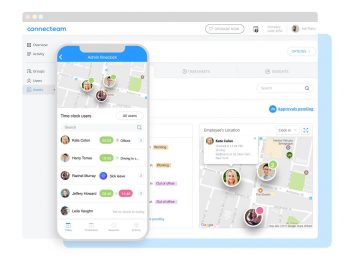
Connecteam schedules drivers and records mobile clock-ins and attendance; approved timesheets move into supported payroll integrations. High-frequency GPS updates, delivery execution, EV management, maintenance, and passenger transport rely on different records, so the primary job determines the type of software required.
What Is a Fleet Management System?
A fleet management system is a digital system businesses use to track vehicles, manage drivers, monitor fuel use, schedule maintenance, and oversee daily fleet activity. GPS trackers, cameras, and onboard sensors capture location, speed, mileage, engine status, and driving behavior, then send the information through a cellular connection to software where managers can review maps, alerts, reports, and service records.
A delivery company can use it to spot excessive idling, assign the nearest truck to a new stop, and schedule service before a breakdown disrupts the day. These insights can cut unnecessary fuel spending, reduce unexpected downtime, and help staff respond faster when routes, vehicle conditions, or workloads change.
Our Top Picks For Fleet Management Systems
 Matrack
- Best For: Small fleets and owner-operators
- Primary Workflow: Commercial telematics and compliance
- Key Verified Capabilities: GPS, FMCSA-registered ELD, AI dashcam, asset tracking
- Important Fit Boundary: Broader telematics relationship instead of a specialist workforce, delivery, maintenance, or transit application
 Connecteam
- Best For: Driver workforce management
- Primary Workflow: Scheduling, timekeeping, attendance, payroll
- Key Verified Capabilities: Job scheduling, mobile clock-in/out, geofencing, timesheets, payroll integrations
- Important Fit Boundary: Employee location and time records are not vehicle diagnostics or ELD telemetry
 US Fleet Tracking
- Best For: High-frequency GPS tracking
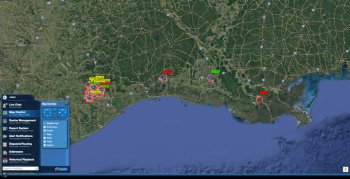
- Primary Workflow: Live vehicle-location monitoring
- Key Verified Capabilities: 5- and 10-second update options, dashboard, geofencing, activity playback
- Important Fit Boundary: Refresh interval does not establish greater GPS accuracy
 Onfleet
- Best For: Last-mile delivery operations
- Primary Workflow: Delivery planning and execution
- Key Verified Capabilities: Route optimization, assignments, recipient communication, proof of delivery
- Important Fit Boundary: Delivery task management instead of vehicle compliance or workshop records
 Geotab
- Best For: EV and mixed-fuel fleets
- Primary Workflow: Telematics, charging, energy, electrification planning
- Key Verified Capabilities: State of charge, charging status, range, mixed-powertrain views, EV suitability analysis
- Important Fit Boundary: Available records vary by vehicle, OEM, integration, and region
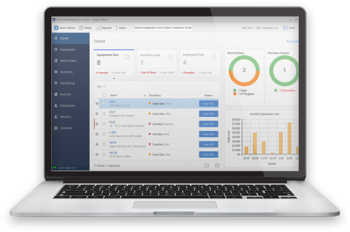 Fleet Maintenance Pro Web
- Best For: Fleet maintenance management
- Primary Workflow: Preventive service and workshop records
- Key Verified Capabilities: PM scheduling, repair requests, work orders, parts/labor, inventory
- Important Fit Boundary: GPS-provider feeds supplement maintenance instead of defining a live tracking product
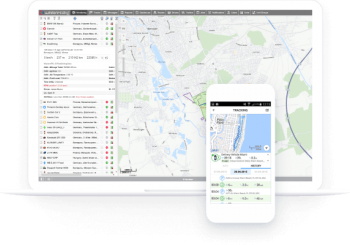 Wialon
- Best For: Public transport fleet operations
- Primary Workflow: Scheduled passenger transport
- Key Verified Capabilities: Routes, schedules, rides, vehicle assignment, monitoring, reports
- Important Fit Boundary: Timetable execution differs from last-mile task routing
How We Tested Fleet Management Systems?
We spent time actually setting up each system, installing trackers, and running them on active vehicles. That gave us a clear view of how quickly data updated on the dashboard and whether the tools worked as smoothly as promised.
The focus wasn’t just on flashy features but on the daily tasks fleets rely on most, like logging driver hours, tracking routes, or checking fuel use. If something slowed down routine operations, we noticed it right away.
Support and setup were part of the process too, since those are the pain points most managers mention. From installation calls to trying out customer chat, we tested how helpful the companies really were when issues came up.
What Are The Best Fleet Management Systems In 2026?
A trucking fleet managing ELD compliance and GPS data needs different software from a delivery business coordinating stops or a transit operator tracking schedules. The seven systems below address different operational needs, including driver scheduling, vehicle tracking, EV monitoring, maintenance, and public transportation.
1. Matrack - Best for Small Fleets & Owner-Operators
Matrack has separate ELD, GPS fleet tracking, AI dash cam, and asset-tracking products, with ELD/dashcam packages available for fleets that want both. Basic ELD costs $19.95 per month with hardware included, and Premium costs $24.95. Current product pages state no contract. Tech.co’s September 2026 comparison named Matrack its “Best-priced ELD compliance” option for budget-conscious truckers and small fleets.
Basic ELD handles HOS and DVIRs; Premium adds GPS tracking and IFTA reporting. GPS Fleet Tracking reports a moving vehicle every 10 seconds and uploads stored positions after cellular service returns. When a driving event needs visual evidence, the M4000 records road and cab video and saves footage from 30 seconds before and after an impact.
Asset tracking handles trailers and equipment without a vehicle power connection. Its primary battery supports reporting intervals from five minutes to 24 hours, depending on configuration. Unexpected movement switches Security Mode to 30-second reporting.
Key Alerts
Key Features
- Free ELD device with no contract requirement
- Trailer tracker with 10-year battery life
- Fuel card integration for automated receipt downloads
- 4G, Wi-Fi, and Bluetooth dashcam connectivity
Alerts
- Real-time ELD violation warnings
- Fatigue and distraction detection notifications
- Geofence exit and entry alerts
- Low battery and tampering alerts
Pros and Cons
| Pros | Cons |
|---|---|
| ✅ Guaranteed $2,000 savings per vehicle per year | ❌ App interface can feel crowded with features |
| ✅ Flexible device options for trucks, trailers, and assets | |
| ✅ AI-powered dashcam with multi-channel coverage | |
| ✅ Integrated factoring service for faster payments |
Product Information
| Specification | Details |
|---|---|
| Device Options | OBD, hardwired, wireless, weatherproof trackers |
| Fuel Savings Guarantee | $2,000 per vehicle annually or free service |
| ELD Pricing | From $19.95/month, device included |
| Dashcam | AI-powered, 5-channel view with driver monitoring |
| Customer Base | 275,000+ units installed, 150+ new fleets monthly |
2. Connecteam - Best for Driver Workforce Management
Driver assignments in Connecteam account for qualifications, vehicle or load requirements, and location. Schedules carry into mobile time tracking, where Breadcrumbs records GPS movement through an employee’s smartphone during clocked-in shifts. Recorded work hours can be transferred through payroll integrations with QuickBooks Online, Gusto, Paychex Flex, and ADP products. Phone-based tracking has its limits, though. Vehicle diagnostics and continuous location monitoring outside employee shifts require separate telematics hardware.
Key Alerts
Key Features
- Digital kiosks with PIN or selfie verification
- Shift attachments for mandatory forms before clock-out
- Weekly automated timesheet email summaries
- Overtime customization by day, week, or holiday
Alerts
- Late or missed clock-in notifications
- Overtime limit breach alerts
- Conflicting timesheet entry warnings
- Reminders for timesheet approval deadlines
Pros and Cons
| Pros | Cons |
|---|---|
| ✅ Geo-fenced mobile time clock ensures accurate shifts | ❌ Setup can be tricky |
| ✅ Integrated payroll exports for QuickBooks and Gusto | ❌ Can get expensive for very large teams |
| ✅ PTO and overtime tracking within the same dashboard | |
| ✅ Bulk timesheet approval saves time for managers |
Product Information
| Specification | Details |
|---|---|
| Free Plan | 100% free for up to 10 users |
| Payroll Integration | QuickBooks, Gusto, Xero, Paychex |
| Compliance | GDPR, ISO 27001, SOC 2 certified |
| Mobile Access | iOS, Android, and browser support |
| User Base | 65,000+ companies globally |
3. US Fleet Tracking - Best for High-Frequency GPS Tracking
Hardwired cellular devices from US Fleet Tracking offer location updates every five or 10 seconds. The ten-second plan costs $29.95 per device monthly, rising to $39.95 for five-second reporting.
Battery-powered and satellite trackers operate under different connectivity and power constraints, so those reporting intervals do not apply to every device. Supported hardware configurations also retain up to 90 days of historical route playback.
Key Alerts
Key Features
- Waterproof AT-V4 Pro with shock-resistant casing
- CloudSat3 solar-powered tracker for remote assets
- Tracklight-VT1611 disguised as a trailer tail light
- Over 20 customizable reports for fleet data
Alerts
- Speeding and idle time notifications
- Virtual fence entry/exit alerts
- Low power and disconnection warnings
- Maintenance schedule reminders
Pros and Cons
| Pros | Cons |
|---|---|
| ✅ Location updates every 5–10 seconds | ❌ Monthly service costs add up on larger fleets |
| ✅ Wide range of devices including OBD, hardwired, and solar trackers | ❌ Bulk reporting can overwhelm with too much detail |
| ✅ Live weather and traffic overlays for route planning | |
| ✅ Discreet trackers for covert monitoring |
Product Information
| Specification | Details |
|---|---|
| Update Frequency | Location refresh every 5–10 seconds |
| Hardware Range | OBD, hardwired, solar, covert trackers |
| Service Cost | $29.95/month per device |
| Special Devices | Tracklight disguised as LED tail light |
| Coverage | Global with 4G LTE connectivity |
4. Onfleet - Best for Last-Mile Delivery Operations
Delivery routes, driver progress, recipient ETAs, and proof of delivery are managed within Onfleet. Dispatchers can follow stops as they progress, with photos or signatures documenting completed tasks. Scale adds auto-dispatch and advanced route optimization, and Enterprise extends operations across multiple regions with lifetime historical reporting. Pricing depends on completed pickup and delivery tasks rather than fleet size. Launch starts at $619 per month for 2,500 tasks, Scale at $1,349 for 5,000, and Enterprise at $3,099 for 10,000 or more.
Key Alerts
Key Features
- Real-time driver tracking on customer-facing map
- Analytics dashboard with delivery time comparisons
- Feedback collection after each delivery
- Multi-industry adaptability (grocery, pharmacy, furniture, etc.)
Alerts
- Delivery status change notifications
- Route deviation alerts
- Task completion confirmations
- Failed delivery attempt alerts
Pros and Cons
| Pros | Cons |
|---|---|
| ✅ Route optimization reduces delivery times significantly | ❌ Pricing rises with higher delivery volumes |
| ✅ Customer ETA updates via automatic SMS | ❌ Limited offline functionality for drivers in poor coverage areas |
| ✅ Proof-of-delivery with photo and signature capture | |
| ✅ Integrates with Shopify, Square, and other e-commerce tools |
Product Information
| Specification | Details |
|---|---|
| Deliveries Powered | 250M+ deliveries, 500M+ miles tracked |
| Industries Supported | Grocery, pharmacy, furniture, beverages, meals |
| Route Optimization | Cuts route duration by up to 17% |
| Integrations | Shopify, Square, custom API |
| Customer Base | 1,000+ enterprise clients in 90+ countries |
5. Geotab - Best for EV & Mixed-Fuel Fleets
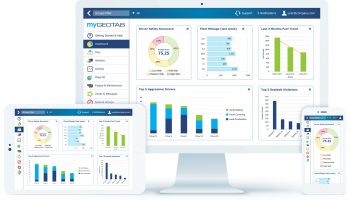
Gasoline, diesel, and electric vehicles can be managed within MyGeotab, with additional diagnostics available for supported EVs. Battery state of charge, charging status, energy consumption, and battery health provide information beyond conventional vehicle tracking. Geotab reports compatibility with more than 300 EV models.
Fleet electrification planning is handled through the EV Suitability Assessment, which examines driving patterns, dwell times, charging options, and locally available electric vehicles. Integrated into MyGeotab, the assessment helps identify conventional vehicles that could be suitable for EV replacement.
Available vehicle data depends on the subscription and hardware compatibility. GO provides EV diagnostic signals unavailable under GO Core, although the exact details vary by vehicle model and OEM connection. U.S. pricing is available by quote.
Key Alerts
Key Features
- State-of-charge and state-of-health monitoring
- Route assignment based on range prediction
- Charging pattern analysis for infrastructure planning
- EV Energy Usage Report comparing electricity vs. fuel
Alerts
- Low charge warning to prevent stranding
- Notifications when vehicles stop charging unexpectedly
- Charging cycle completion alerts
- Alerts for plug-in hybrids running on fuel only
Pros and Cons
| Pros | Cons |
|---|---|
| ✅ Supports 300+ EV models with detailed data | ❌ Heavy reporting data can overwhelm new users |
| ✅ EV Suitability Assessment identifies vehicles ready for electrification | ❌ Advanced EV insights require proper staff training to interpret |
| ✅ Real-time battery health and charging status tracking | |
| ✅ Charging cost analysis by vehicle, location, and time of day |
Product Information
| Specification | Details |
|---|---|
| EV Support | 300+ EV models supported |
| Key Tool | EV Suitability Assessment (EVSA) |
| Data Insights | Battery health, charging, auxiliary energy |
| Charging Reports | Cost analysis by vehicle, time, location |
| Adoption | Used by major enterprises like Enterprise Holdings |
6. Fleet Maintenance Pro Web - Best for Fleet Maintenance Management
Preventive service and unexpected repairs are organized through repair requests and work orders in Fleet Maintenance Pro Web. Parts, labor, and completed maintenance remain attached to the job, providing a history of work performed on each vehicle. Premium adds parts inventory, warehouse management, and purchase orders.
Enterprise can import mileage and engine-hour readings from an external GPS provider through daily meter updates. Those readings feed maintenance schedules and help identify vehicles approaching their next service.
Key Alerts
Key Features
- Customizable work order templates with parts suggestions
- Daily inspection checklists for DOT compliance
- Multi-warehouse inventory tracking with low stock alerts
- Custom report filtering by location, date, or equipment type
Alerts
- Service due notifications
- Expiration and inspection deadline alerts
- Low inventory warnings
- Fuel usage irregularity alerts
Pros and Cons
| Pros | Cons |
|---|---|
| ✅ Cloud access from any device, anywhere | ❌ Interface design feels dated compared to newer platforms |
| ✅ Automated preventive maintenance schedules | ❌ Sync delays can occur when multiple users update work orders simultaneously |
| ✅ Integrated fuel tracking with GPS meter updates | |
| ✅ Inventory system prevents downtime from missing parts |
Product Information
| Specification | Details |
|---|---|
| Access | Cloud-based via PC, tablet, smartphone |
| Maintenance Scheduling | Automated preventive & repair scheduling |
| Inventory | Low stock alerts with warehouse tracking |
| Fuel Tracking | Integrated fuel card imports |
| Compliance | Daily inspection checklists for DOT standards |
7. Wialon - Best for Public Transport Fleet Operations
Public transport monitoring through Wialon’s NimBus application connects vehicles with assigned rides, routes, and timetables. Expected arrival times at checkpoints allow operators to identify delays, missed stops, and route deviations against planned service.
Wialon is sold through service-provider partners, with costs determined by hardware, connected vehicles, enabled functions, and provider configuration. NimBus remains operational and supported in Maintenance mode, although no new features are planned. Fleets considering a new deployment should account for that limitation before choosing the platform.
Key Alerts
Key Features
- Event-based notifications for early or late arrivals
- Stop and ride history reports
- Specialized ACL system for user permissions
- Compatible with 3,800+ tracking devices
Alerts
- Notifications for route deviations
- Arrival and departure alerts at each stop
- Real-time vehicle status change alerts
- Schedule adherence alerts
Pros and Cons
| Pros | Cons |
|---|---|
| ✅ Easy setup of stops, routes, and schedules | ❌ Mid-route changes take extra coordination |
| ✅ Real-time tracking with timeline view for buses | ❌ Initial training needed for dispatchers to use advanced tools fully |
| ✅ Reports on route adherence and performance | |
| ✅ API for integration with planning and ticketing tools |
Product Information
| Specification | Details |
|---|---|
| Vehicle Connections | 4.2M+ vehicles connected |
| Route Tools | Stop creation, route binding, schedule planning |
| Performance Reports | Detailed route adherence tracking |
| Compatibility | 3,800+ tracking devices supported |
| Community | 2,700+ partners in 160 countries |
How to Choose the Right Fleet Management System
Start with the job that triggered the purchase, then work backward to the records, hardware, compliance rules, and integrations required to manage it.
- Name the primary job: Decide whether the immediate problem is vehicle telematics, workforce administration, live location cadence, delivery execution, EV management, maintenance control, or scheduled passenger transport. Do not let secondary features outweigh the work that triggered the purchase.
- Trace the source record: Vehicle-connected hardware produces different inputs from employee apps, delivery tasks, maintenance histories, and transit schedules. Ask what the software reads, how often that record changes, and who acts on it.
- Separate compliance from location tracking: U.S. carriers subject to ELD requirements need to verify the device on FMCSA’s current registered list and confirm that the product matches the operation’s HOS process. For a dedicated compliance purchase, Best ELDs keeps that evaluation separate from ordinary GPS tracking.
- Match the vehicle and asset mix: Trucks, vans, EVs, trailers, heavy equipment, and non-powered assets do not generate the same records. Confirm asset-specific hardware for trailers, and confirm that the vehicle or integration exposes the EV fields the operation needs.
- Set a location-refresh requirement: If dispatch reacts to rapid movement, shorter intervals deserve more weight. Periodic location awareness places less emphasis on rapid refresh. Write down the dispatch decision that depends on the refresh rate before treating a faster interval as necessary.
- Define the specialist workflow before adding integrations: Delivery teams need assignments, status, recipient communication, and completion records. Maintenance departments need work orders, parts, labor, and service history. Passenger operators work from routes and timetables. Match the record set to the department that owns the work.
- Check downstream handoffs: Payroll, accounting, order systems, APIs, GPS providers, and fuel-card records matter when staff move records between applications. If fuel purchasing is a separate procurement question, Best Fuel Cards keeps that evaluation focused on card programs instead of stretching fleet-management software into another category.
- Read the commercial and implementation terms: Contract length, hardware commitments, installation requirements, administrator roles, and service channels affect the rollout after the feature review is complete. Compare the terms that apply to the actual deployment; vendors do not necessarily sell or onboard the same way.
What Are the Key Benefits of Fleet Management Software?
Day-to-day value comes from matching the right records to the people making decisions.
- Current operating picture: Location, trip, task, service, or schedule records give dispatchers and managers the status tied to their job. A dispatcher needs location; a maintenance manager needs service status.
- Cost and waste review: Mileage, idling, route history, maintenance timing, and fuel-related records provide a basis for investigating avoidable spend. Software records provide evidence for a decision; no savings percentage is guaranteed.
- Driver safety oversight: Driver-behavior events and video records add context for coaching and incident review when those capabilities are part of the deployment. A dedicated Best Dash Cams guide handles the camera-specific purchase.
- Maintenance planning: Odometer readings, fault codes, inspections, service intervals, and repair history help maintenance staff decide when a vehicle needs attention. Full work-order control remains separate from a basic maintenance alert.
- Route and service control: Location gains context when tied to a delivery task, scheduled stop, ETA, or passenger timetable. Staff then compare planned work with activity on the road.
Which Fleet Management System Fits Your Fleet?
Primary operating need | Product to shortlist |
Small-fleet or owner-operator telematics and compliance | Matrack |
Driver scheduling, timekeeping, and payroll workflow | Connecteam |
Frequent GPS position updates | US Fleet Tracking |
Last-mile delivery execution | Onfleet |
EV and mixed-powertrain management | Geotab |
Preventive maintenance and workshop records | Fleet Maintenance Pro Web |
Scheduled public or corporate transport | Wialon |
Build the shortlist from the record that drives the operation. Vehicle telemetry points toward telematics; employee time records point toward workforce software; delivery tasks, service history, EV charge records, and passenger schedules lead to other categories. After the primary job is settled, hardware, integrations, compliance requirements, and commercial terms become easier to compare.
Final Thoughts
Owner-operators and small-to-growing commercial fleets that need GPS tracking, FMCSA-registered ELD compliance, AI dashcams, asset tracking, and month-to-month billing have the strongest reason to consider Matrack. Keeping those functions with one provider reduces the need for separate telematics, compliance, video, and asset-tracking contracts.
For fleets with those requirements, Matrack is the recommendation from this list. Driver scheduling, high-frequency GPS updates, last-mile delivery, EV management, maintenance, and passenger transport call for different software when those jobs take priority.