

ELD systems track driving time automatically and help truck drivers maintain accurate Hours of Service (HOS) records. Correct usage depends on daily actions such as logging in properly, selecting the right duty status, reviewing logs, and certifying records after each shift.
Improper ELD handling can create log errors, unassigned driving time, or compliance violations during roadside inspections. Drivers who understand how to manage duty status changes, log edits, and data transfers can maintain clean records and avoid penalties.
Practical usage habits make ELD operation easier during long hauls and busy delivery schedules. Ten practical tips below explain how truck drivers can use an ELD correctly, maintain compliant logs, and stay prepared for inspections.
Why Proper ELD Usage Matters for Truck Drivers
Proper ELD usage helps truck drivers maintain accurate logs and stay compliant with Hours of Service regulations.
- Regulatory Compliance: Correct ELD operation ensures driving hours are recorded according to FMCSA rules, helping drivers avoid costly violations and penalties.
- Inspection Readiness: Accurate electronic logs make roadside inspections faster and smoother since enforcement officers can review records quickly.
- Driver Safety: Proper duty status tracking helps drivers manage rest periods effectively, reducing fatigue and improving overall road safety.
- Accurate Records: Consistent log reviews and updates keep electronic records clean and reliable for both drivers and fleet managers.
10 Practical Tips for Using an ELD Correctly
Consistent ELD habits help truck drivers maintain accurate Hours of Service records and avoid compliance issues during inspections. Clear operational practices such as logging in properly, updating duty status, and reviewing logs daily make electronic logging systems easier to manage on every trip.
1. Log Into the ELD Before Starting Your Vehicle
Driver login connects the Electronic Logging Device to the correct driver profile before any vehicle movement is recorded. Proper login ensures driving time, engine activity, and duty status changes are associated with the right operator.
Unassigned driving time often occurs when a truck begins moving before the driver logs in. Logging into the system at the start of every shift keeps electronic records organized and prevents unnecessary log corrections later.
2. Check Your Available Driving Hours Before Each Trip
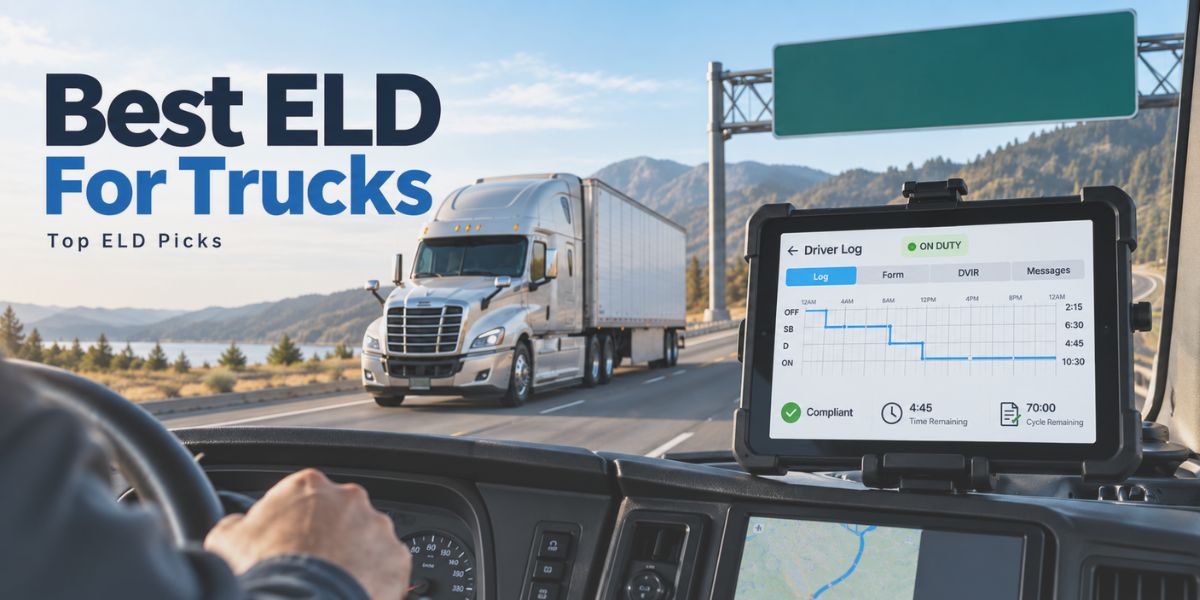
ELD dashboards display remaining driving hours based on Hours of Service limits. Reviewing these hours before starting a trip helps drivers plan routes, schedule rest breaks, and avoid exceeding legal limits.
Careful monitoring of available hours also improves trip planning during long hauls. Drivers who check their driving limits early can adjust schedules and prevent last-minute compliance issues.
3. Keep Your Duty Status Updated
Duty status should always reflect the driver’s actual activity throughout the shift. Switching between Driving, On Duty Not Driving, Sleeper Berth, and Off Duty keeps electronic records aligned with daily work tasks.
Missed status updates can create inaccurate logs that raise concerns during inspections. Regularly updating duty status ensures the ELD logbook remains reliable and compliant.
4. Review Your Logs for Errors Every Day
Daily log reviews help drivers confirm that recorded driving activity matches their actual schedule. Small mistakes such as incorrect duty status changes can be identified quickly during routine checks.
Correcting these issues early prevents problems during compliance reviews or roadside inspections. Drivers who consistently check their logs maintain cleaner and more reliable records.
5. Certify Your Logs at the End of Each Shift
Driver certification confirms that the electronic log accurately reflects the workday. Completing this step finalizes the record and prepares it for inspection if requested by enforcement officers.
Certified logs also help maintain a clear compliance history. Regular certification ensures the driver’s Hours of Service records remain complete and verified.
6. Use Annotations When Editing Logs
Log edits sometimes become necessary when correcting incorrect entries. Adding an annotation explains why the change was made and provides transparency within the record.
Clear annotations help inspectors understand the reason behind adjustments. Detailed notes strengthen the credibility of electronic log records during compliance checks.
7. Know the Steps for Handling ELD Malfunctions
ELD systems occasionally generate malfunction alerts that require attention from the driver and carrier. Drivers must understand how to report the issue and follow required procedures until the device is repaired.
Temporary paper logs may be required during this time. Knowing these steps ensures driving activity remains documented even if the electronic device experiences problems.
8. Make Sure the ELD Is Properly Connected to the Engine
Electronic Logging Devices collect driving data directly from the vehicle’s engine system. A stable connection allows the device to record engine hours, vehicle movement, and driving time accurately.
Loose connections or hardware issues may interrupt data collection. Reliable systems designed for stable engine synchronization, including platforms like Matrack ELD Compliance, help ensure driving records remain accurate.
9. Be Ready to Transfer Logs During Roadside Inspections
Roadside inspections often require drivers to provide electronic log records for review. Most ELD systems allow drivers to display logs on the device or transfer them electronically to enforcement officers.
Drivers who understand the transfer process can complete inspections quickly. Familiarity with the device interface helps avoid delays during compliance checks.
10. Keep Your ELD Instruction Sheet Accessible
Federal regulations require drivers to carry ELD instruction documents inside the vehicle. These instructions explain how the device works and how logs can be transferred during inspections.
Keeping the instruction sheet nearby ensures drivers can respond to questions about the device. Quick access to this information helps drivers remain prepared during regulatory checks.
Common Mistakes Truck Drivers Should Avoid When Using an ELD
Incorrect ELD practices can create inaccurate logs and increase the risk of Hours of Service violations during roadside inspections.
Status Errors
Duty status must always match the driver’s current activity during the shift. Missing a status change between Driving, On Duty, Off Duty, or Sleeper Berth can create incorrect records in the ELD log.
Unassigned Driving
Unassigned driving time appears when the vehicle moves without a driver logged into the ELD system. Drivers should review these events regularly and assign them correctly to maintain accurate records.
Skipped Reviews
Log errors can occur due to missed duty status updates or brief device interruptions. Reviewing logs daily helps drivers detect and correct mistakes before inspections.
Missed Certification
Driver certification confirms that the electronic log accurately reflects the workday. Skipping certification may leave records incomplete and create compliance issues.
Malfunction Response
ELD malfunction alerts require drivers to follow specific reporting and documentation steps. Knowing how to respond ensures driving activity remains properly recorded until the device issue is resolved.
Conclusion
Electronic Logging Devices simplify how truck drivers track driving hours and maintain compliant records under Hours of Service regulations. Correct usage depends on consistent habits such as accurate duty status updates, regular log reviews, and proper certification after each shift.
Practical ELD management helps drivers avoid common mistakes like unassigned driving time or incomplete records. Drivers who follow clear operating practices can handle inspections confidently and maintain accurate electronic logs throughout every trip.
Reliable ELD usage ultimately supports safer driving schedules and smoother fleet operations. Following these practical tips helps truck drivers keep records organized, remain compliant with regulations, and focus on efficient and responsible driving.
Frequently Asked Questions
How do truck drivers log in to an ELD?
Drivers log in by entering their unique driver ID or credentials on the ELD device or connected mobile app. Login connects the driver profile to the vehicle so the system records driving activity under the correct operator.
Can truck drivers edit ELD logs?
Drivers can edit certain log entries if incorrect duty status or information appears in the record. Every change must include an annotation explaining the reason for the edit.
What happens if an ELD stops working?
ELD malfunction alerts require drivers to report the issue to the carrier and follow temporary logging procedures. Drivers may need to maintain paper logs until the device is repaired or replaced.
How do drivers show ELD logs during roadside inspections?
Drivers can present logs directly on the ELD display screen or transfer them electronically to enforcement officers. Most devices support wireless or telematics data transfer for faster inspections.
Do drivers need to certify ELD logs daily?
Daily certification confirms that the recorded Hours of Service data is accurate and complete. Drivers should certify logs at the end of each shift to keep records compliant and inspection-ready.